
✦ AI Summary
Table of Content
▲- What Is Banglarbhumi and Who Can Use It?
- Key Land Record Terms You Must Understand First
- Major Services Available on Banglarbhumi
- How to Check Khatian and Plot Information on Banglarbhumi
- How to Check Mutation (Namjari) Status
- How to Check RS-LR Plot Information
- Banglarbhumi Portal vs Traditional Land Record System
- How to Download e-Porcha (Certified Copy of Land Record)
- Jomir Tothya App vs Banglarbhumi Website
- Common Mistakes to Avoid While Using Banglarbhumi
- Conclusion
Banglarbhumi is West Bengal’s official digital gateway for land records, and in 2026, it remains the single most important digital tool for every landowner, homebuyer, and property investor in the state. Managed by the Land & Land Reforms and Refugee Relief & Rehabilitation (L&LR & RRR) Department, Government of West Bengal, the portal brings Khatian details, plot information, RS-LR records, mutation status, land maps, and revenue services into one centralized system, accessible 24/7, without visiting a government office or depending on a middleman for information that should always have been publicly accessible.
What Is Banglarbhumi and Who Can Use It?
The Banglarbhumi portal at banglarbhumi.gov.in is West Bengal’s state-managed land records and revenue administration platform. It covers over 42,000 Mouzas across all districts and serves a wide range of users, landowners, first-time homebuyers, agricultural land sellers, legal professionals, financial institutions, and NRIs performing due diligence from abroad.
|
Portal Detail |
Information |
|---|---|
|
Official URL |
banglarbhumi.gov.in |
|
Managed By |
L&LR & RRR Department, Govt. of West Bengal |
|
Key Services |
Khatian, Plot Info, Mutation, e-Porcha, RS-LR, Khajna Payment |
|
Access Type |
Free, Basic searches without login, Advanced services require registration |
|
Mobile App |
Jomir Tothya (Android) |
|
Languages |
Bengali and English |
Key Land Record Terms You Must Understand First
Most search failures on the portal happen not because of a technical issue, but because users misunderstand three foundational terms. Clarifying these before you search saves significant time and prevents “Record Not Found” errors.
- Khatian Number (RoR): The master ownership record ID. It covers the owner’s name, land area, classification, tax data, and may include multiple plots. All searches should begin here.
- Plot Number (Dag Number): Identifies one specific land parcel. One Khatian can hold several Dag numbers. Interchanging the two is the single most common reason searches fail.
- Mouza: The revenue village unit, not your postal address or familiar village name. Selecting the wrong Mouza from the district-block dropdown is the most frequent mistake first-time users make.
- RS vs LR Records: RS (Revisional Survey / Sabek Dag) are older survey-era records; LR (Land Reforms / Hal Dag) are the current updated records. The portal allows both RS-to-LR and LR-to-RS matching.
Also Read: Dharani Portal Guide: Checking Land Status and Registration in Telangana
Major Services Available on Banglarbhumi
- Khatian and Plot Information (Know Your Property)
- RS-LR Plot Mapping and Conversion
- Online Mutation Application and Status Tracking
- e-Porcha / Record of Rights (RoR) Certified Copy Download
- Mouza and Plot Map Access
- Online Khajna (Land Revenue) Payment
- Land Conversion Application (Agricultural to Residential/Commercial)
- Warish (Inheritance) Application
- Application GRN Search and Receipt Reprint
- Public Grievance Filing and Status Tracking
How to Check Khatian and Plot Information on Banglarbhumi
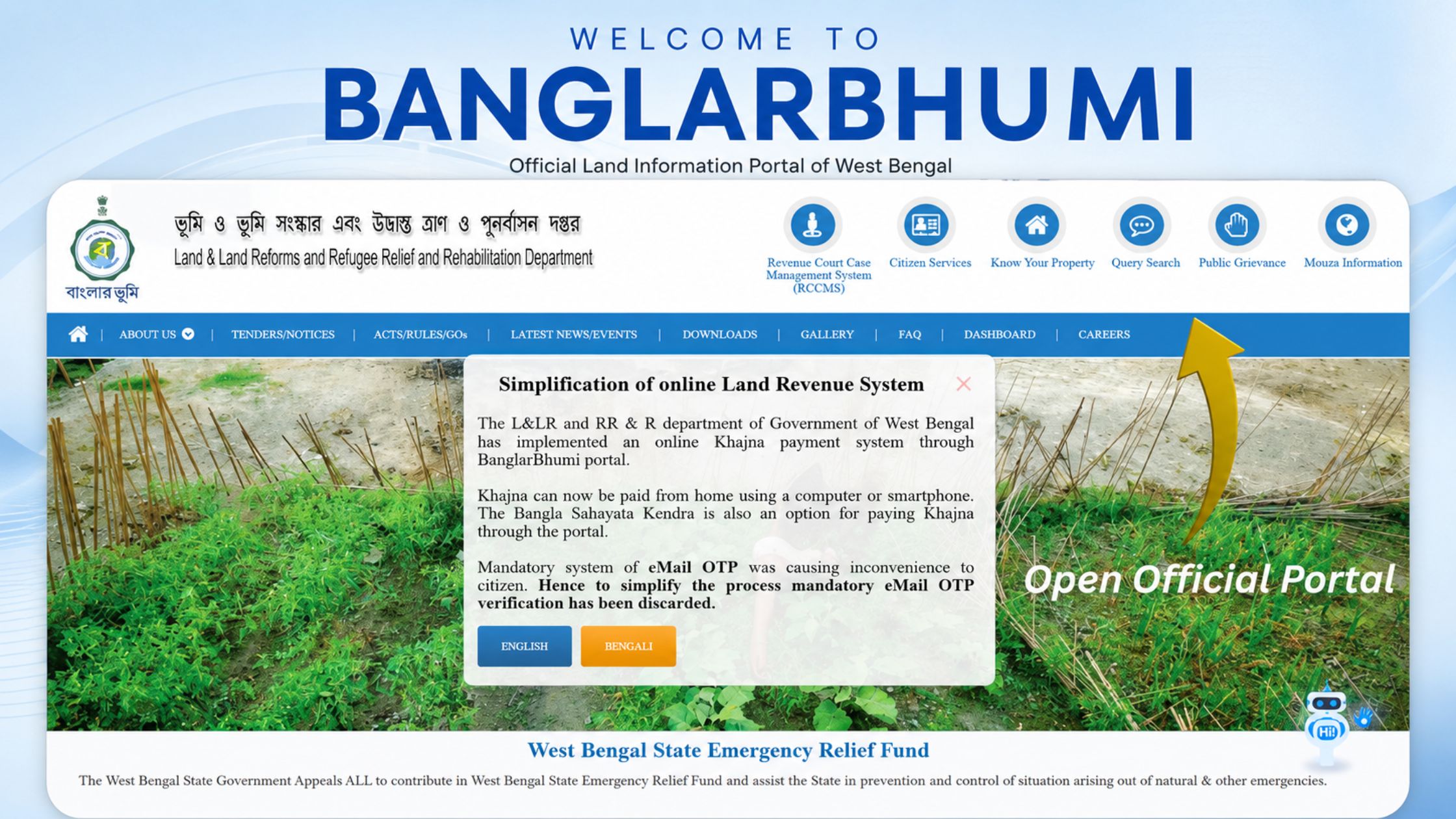
Verifying ownership before any property transaction is the most important step a buyer can take. The process on the portal is straightforward when the correct identifiers are in hand.
- Visit banglarbhumi.gov.in and log in using your registered mobile number and password. Basic Khatian viewing does not require a login, but downloading records does.
- Click “Know Your Property” from the top navigation menu on the homepage.
- Select your District, then Block, then Mouza from the sequential dropdowns. Take care to select the correct revenue Mouza, not the postal village name.
- Choose your search type, Khatian Number or Plot (Dag) Number, and enter the value accurately.
- Solve the captcha and click View. The record displays owner name, land area, plot numbers, current land classification, and ownership status.
Important: Always verify land records as close to your actual transaction date as possible. A record downloaded weeks before a purchase does not protect against ownership changes that occurred after that download.
How to Check Mutation (Namjari) Status
Mutation is the process of updating government ownership records after a property sale, inheritance, or gift transfer. An unmutated property — where the revenue records still show a previous owner after a transfer, creates title complications that the buyer inherits along with the property.
- Log in → Citizen Services → Mutation Status
- Choose Case-Wise Search or Application Number Search
- Enter District, Block, Mouza, and your Case Number or Application Number
- Click Search to view the real-time mutation processing status
The ownership record should reflect a complete, unbroken chain of mutation updates from the original holder to the current seller. Any gap in this chain requires resolution before purchase.
How to Check RS-LR Plot Information
This service is particularly important when your existing documents reference older RS (Sabek Dag) plot numbers that need to be matched with current LR (Hal Dag) numbers in the land record system.
- Log in → Citizen Services → RS-LR Information
- Select District, Block, and Mouza
- Choose direction: RS → LR (old to current) or LR → RS (current to old)
- Enter the plot number, solve the captcha, and click View
The result displays both RS and LR numbers side by side, allowing buyers to confirm that the plot described in old sale deeds corresponds correctly to the currently registered land parcel.
Banglarbhumi Portal vs Traditional Land Record System
|
Feature |
Banglarbhumi Portal |
Traditional BL&LRO Office |
|---|---|---|
|
Accessibility |
24/7 Online |
Office Hours Only |
|
Record Search Speed |
Instant |
Manual, Days to Weeks |
|
Mutation Tracking |
Real-Time Online |
In-Person Follow-Up Required |
|
e-Porcha / RoR Access |
Online Download |
Physical Copy Collection |
|
Khajna Payment |
Online |
Counter Payment Only |
|
Grievance Filing |
Online with UPN Tracking |
Written Application |
|
Transparency |
High |
Moderate |
|
Middleman Dependency |
None |
Often Unavoidable |
How to Download e-Porcha (Certified Copy of Land Record)
e-Porcha is the officially digitally-signed Record of Rights, legally valid for home loan applications, court proceedings, and property registration offices.
- Log in → Citizen Services → GRN / Application Search
- Enter your GRN Number or Application Number
- Complete the captcha and submit
- View and download the certified e-Porcha as a PDF
Basic Khatian viewing is free. Downloading a certified e-Porcha copy costs between ₹20 to ₹50 depending on district and service type, payable online through the portal.
Also Read: E-Panjiyan Rajasthan: Calculating Stamp Duty and DLC Rates Online
Jomir Tothya App vs Banglarbhumi Website
|
Feature |
Jomir Tothya App |
Banglarbhumi Website |
|---|---|---|
|
Platform |
Android |
Browser (Mobile + Desktop) |
|
Best For |
Quick Khatian / plot lookups |
Full applications and certified downloads |
|
Mutation Application |
Not available |
Available |
|
e-Porcha Download |
Not available |
Available |
|
Language Support |
Bangla, English, Devanagari |
Bangla, English |
|
Payment Support |
Yes (basic) |
Yes (complete) |
Use the Jomir Tothya app for fast on-the-go checks. For mutation applications, e-Porcha, or RS-LR searches, the full website is the better choice.
Common Mistakes to Avoid While Using Banglarbhumi
- Entering incorrect Mouza details is the leading cause of failed searches. The revenue Mouza and the familiar village name are frequently different, always verify the correct Mouza from official land documents rather than from verbal information or assumptions.
- Not verifying mutation status independently is a significant gap in many buyers’ due diligence. A property whose last two ownership transfers remain unmutated in revenue records carries title risk that a basic Khatian view will not make immediately obvious.
- Relying on outdated downloaded records is a risk that many buyers overlook. A Khatian printout from three months ago does not protect against ownership changes or encumbrances added after that date.
- Ignoring land classification carries serious consequences. Agricultural land, homestead land, and government-assigned land each carry different rules around purchase eligibility and permissible use.
- Confusing RS and LR plot numbers causes buyers to believe they are purchasing one parcel when the current registered parcel is different. Always use the RS-LR matching service to confirm continuity between old documents and current records.
Conclusion
Banglarbhumi allows for all the essential land record services - verifying ownership for land sale or purchase, tracking the status of the mutation application for a past sale or purchase, getting a certified e-Porcha for a home loan - to all be done in one place, 24 hours a day, 7 days a week, without having to deal with a middleman to perform the property transactions that we have had to do in the past due to strict land administration policies in West Bengal.
In 2026, Banglarbhumi has created a very transparent land administration system by allowing users to verify land records correctly, verify the correct stages of the mutation chain, verify the land classification of the property they are purchasing, etc., which is what makes the property transactions secure versus having inherited legal complications with the transactions. Save banglarbhumi.gov.in, have your Khatian number and Dag number available, and use them as your first step rather than last, in all future property decisions.



Ans 1. Banglarbhumi is the official Government of West Bengal portal for land records and revenue administration. It allows citizens to check Khatian and plot details, track mutation status, download certified e-Porcha copies, access RS-LR plot mapping, pay Khajna online, apply for land conversion, and file grievances, all without visiting a government office.
Ans 2. Basic Khatian and plot searches under Know Your Property can be performed without registration. However, registration is mandatory for downloading certified e-Porcha copies, applying for mutation or land conversion, tracking application status, and accessing the GRN search service.
Ans 3. The Khatian Number is the master ownership record covering the owner's name, total land area, classification, and multiple plots. The Dag Number (Plot Number) identifies one specific land parcel. A single Khatian can contain multiple Dag numbers, using them interchangeably is the most common reason land searches return no results.
Ans 4. Log in to banglarbhumi.gov.in and navigate to Citizen Services then Mutation Status. Search using your Case Number or Application Number along with District, Block, and Mouza details. The portal shows real-time mutation processing status. An incomplete mutation chain is a title risk that must be resolved before any purchase.
Ans 5. e-Porcha is the digitally signed certified copy of the Record of Rights (RoR) issued through Banglarbhumi. It is legally valid for home loan applications, property registration offices, and court proceedings. Certified copy download costs Rs. 20 to Rs. 50 depending on district and service.
Ans 6. RS (Revisional Survey / Sabek Dag) are older land survey records from the pre-Land Reforms era. LR (Land Reforms / Hal Dag) are the current updated land records. Buyers must use the Banglarbhumi RS-LR Information service to confirm that old plot numbers in their documents correctly map to current registered parcels.
Ans 7. No. The Banglarbhumi portal does not currently support name-based land record searches. You must search using either the Khatian Number or the Dag (Plot) Number. If you do not have these details, contact your local Block Land & Land Reforms Office (BL&LRO) or check existing sale deeds.
Ans 8. Basic Khatian and plot viewing is completely free. Downloading a certified e-Porcha or RoR costs between Rs. 20 to Rs. 50 depending on the service and district. Mutation applications, land conversion, and Khajna payments carry applicable government fees payable online. Registration, RS-LR viewing, and grievance filing are free.
Ans 9. No. Jomir Tothya is the official Government of West Bengal mobile app for quick land record lookups on Android. It does not support mutation applications, e-Porcha downloads, RS-LR searches, land conversion applications, or Khajna payments. For any of these services, the full Banglarbhumi website is required.
Ans 10. Mutation updates are processed by the BL&LRO office and may take time to reflect in the digital system after the physical order is passed. If your mutation has been approved but the portal still shows old ownership, verify the mutation order date with your BL&LRO office and allow processing time. Always independently confirm mutation status on the portal before finalizing any purchase.