
✦ AI Summary
Table of Content
▲- What Is the Bhulekh Bihar Portal?
- Official Portals: All in One Place
- Step 1: Check Apna Khata (Record of Rights)
- Step 2: View Jamabandi Panjee (Register II)
- Step 3: Check Bhu Naksha (Land Map) Online
- Step 4: Apply for Mutation (Dakhil Kharij) Online
- Step 5: Check Mutation (Dakhil Kharij) Status
- Step 6: Pay Land Tax (Bhu Lagaan) Online
- Bihar Bhulekh Portal: Everything It Covers
- Why This Portal Actually Matters in 2026
- Conclusion
Bhulekh Land Records in Bihar are now digitized, no Anchal office visits, no queues, no middlemen. Whether you're a farmer checking ancestral land, a buyer doing due diligence before a sale deed, or a legal professional pulling a Record of Rights, the Bihar Bhumi portal at biharbhumi.bihar.gov.in handles everything.
This guide walks you through every step, from Jamabandi to Dakhil Kharij to Bhu Lagaan, with all portal links and what to keep handy.
What Is the Bhulekh Bihar Portal?
The Bhulekh Bihar portal is the official digital land records system run by the Department of Revenue and Land Reforms, Bihar. It gives citizens 24×7 free access to ownership data, plot maps, mutation status, and land tax payment, all in one place. Before this, getting a Jamabandi copy meant multiple office visits and, often, unofficial "facilitation" fees. The portal cut all of that out.
Key Terms You Should Know Before You Start
|
Term |
What It Means |
|---|---|
|
Khata Number |
Identification number of the landowner |
|
Khasra / Khesra Number |
Unique identification number of a specific plot |
|
Jamabandi (ROR) |
Record of Rights shows ownership history |
|
Khatauni |
Consolidated land statement for a family |
|
Bhu Naksha |
Digital map showing land boundaries and size |
|
Dakhil Kharij |
Mutation: ownership transfer in government records |
|
Mauza / Mouza |
Village-level administrative land unit in Bihar |
Note: In Bihar, Khasra is locally called Khesra and Khatauni is referred to as Jamabandi. Keep that in mind when navigating the portal it does matter.
Also Read: Top 5 Tier-2 Cities in India for Real Estate Investment in 2026
Official Portals: All in One Place
|
Service |
Portal URL |
|---|---|
|
Main Bihar Bhumi Portal |
biharbhumi.bihar.gov.in |
|
Bhu Naksha (Land Map) |
bhunaksha.bihar.gov.in |
|
Bhumi Jankari Advanced Search |
bhumijankari.bihar.gov.in |
|
Online Land Tax (Bhu Lagaan) |
bhulagan.bihar.gov.in |
|
Mutation Status Check |
lrc.bih.nic.in |
Step 1: Check Apna Khata (Record of Rights)
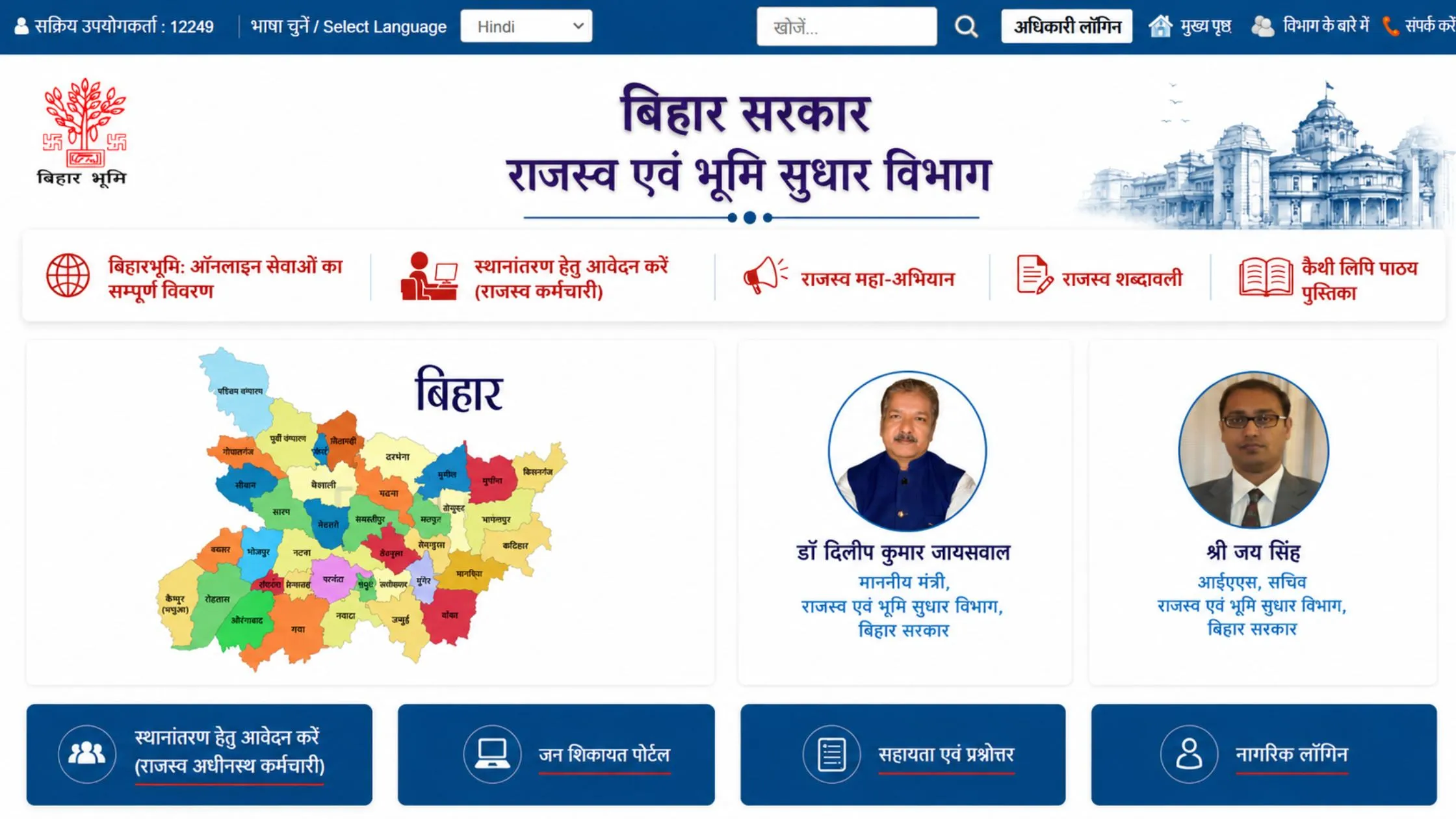
This is the most-used feature on the Bihar Bhumi portal and honestly, it's pretty straightforward once you know the flow.
- Go to biharbhumi.bihar.gov.in and click "Apna Khata Dekhen"
- A map of Bihar opens and select your District
- Choose your Circle (Anchal)
- Select your Mauza (village)
- Search by Khata number, Khasra number, or owner's name
- Click "Search Account", full land details appear on screen
- Hit "View" to read your complete ROR, then download or print as PDF
Pro Tip: Don't have your Khata or Khasra number? Use the Bhumi Jankari portal at bhumijankari.bihar.gov.in and search by the owner's name directly.
Step 2: View Jamabandi Panjee (Register II)
- On the Bihar Bhumi homepage, click "View Jamabandi Register"
- Select your District and Zone (Rajaswa Kshetra), then click "Proceed"
- Choose Halka and Mouza from the dropdowns
- The Register II details load on screen, save or download as PDF
One thing worth knowing: the portal lets you view your Jamabandi in all 22 official Indian languages, not just Hindi or English. Useful if you're dealing with records on behalf of someone who isn't comfortable in either.
Step 3: Check Bhu Naksha (Land Map) Online
- Visit bhunaksha.bihar.gov.in
- On the left panel, select District, Sub-Division, Circle, and Mauza
- The village map loads automatically
- Click your plot (Khasra) number on the map, owner name and area details appear
- Download the digitized land map from the Land Parcel Search section
Step 4: Apply for Mutation (Dakhil Kharij) Online
Mutation is the step most buyers skip and then regret. After any purchase or inheritance, ownership must be updated in government records, that's Dakhil Kharij. Skip it and the old owner's name stays, which causes problems later.
- Visit biharbhumi.bihar.gov.in → click Apply for Mutation Online
- Register or log in using your mobile number and OTP
- Fill in the mutation application with property details (Khata, Khasra, District, Mauza)
- Upload required documents:
- Sale deed or inheritance document
- Identity proof (Aadhaar card)
- Previous land records
- Submit and save your Case Number for tracking
Step 5: Check Mutation (Dakhil Kharij) Status
- Visit biharbhumi.bihar.gov.in → click Dakhil Kharij Application Status
- Select your District
- Search using Case Number, Deed Number, or Plot details
- Enter captcha and click Search — status shows up instantly
Alternatively, head to lrc.bih.nic.in → Online Mutation → enter your application number.
Step 6: Pay Land Tax (Bhu Lagaan) Online
- Visit biharbhumi.bihar.gov.in → click Bhu-Lagaan
- You'll be redirected to bhulagan.bihar.gov.in
- New user? Register first. Existing user? Log in directly
- Click "Pay Online" → select District and Zone → click Proceed
- Enter land details, verify the amount, complete payment digitally
Also Read: Best Areas for PG and Rental Income in Noida
Bihar Bhulekh Portal: Everything It Covers
|
Feature |
Available? |
|---|---|
|
View Jamabandi / Record of Rights |
Yes |
|
Download Land Records as PDF |
Yes |
|
Bhu Naksha (Digital Land Map) |
Yes |
|
Apply for Mutation Online |
Yes |
|
Track Mutation Status |
Yes |
|
Pay Land Tax (Bhu Lagaan) Online |
Yes |
|
Aadhaar / Mobile Seeding |
Yes |
|
Revenue Court Case Status |
Yes |
|
24×7 Free Access |
Yes |
Why This Portal Actually Matters in 2026
Land records in Bihar had a long history of being unclear and disputed. The Bihar Bhumi digitization drive changed that:
- Zero cost on every service is completely free
- No middlemen as you have access to your own records directly
- Dispute prevention as verified digital records are harder to challenge
- Safer buying which confirm ownership and land type before any transaction
- Multi-language as records available in all 22 official Indian languages
Conclusion
Bhulekh land records in Bihar are now mostly digital and you can get to them from your phone. There’s no real reason to keep depending on paper files or those informal sources, for something as serious as land ownership. Whether you’re searching for Jamabandi, Bhu Naksha, checking mutation updates or even Bhu Lagaan, it’s practically all in one portal. Still, make sure you verify directly on the official site, biharbhumi.bihar.gov.in.






Ans 1. Bhulekh Bihar is Bihar's official online land records portal, managed by the Department of Revenue and Land Reforms. Enter your district, village, and Khata or Khasra number to instantly view Jamabandi, ownership details, and land maps.
Ans 2. Visit biharbhumi.bihar.gov.in → click "Apna Khata Dekhen" → select District, Circle, and Mauza → choose "By Owner Name" → enter the name → click "Search Account." All matching records appear.
Ans 3. Yes, completely free. The portal is accessible 24×7 with no registration fees, service charges, or hidden costs for viewing, downloading, or printing land records.
Ans 4. A Khata number belongs to a landowner and can cover multiple plots. A Khasra (Khesra) number identifies one specific plot. One Khata can contain several Khasra numbers.
Ans 5. Visit biharbhumi.bihar.gov.in → click "Dakhil Kharij Application Status" → select district → enter Case Number or Deed Number → enter captcha → Search. Status appears instantly.
Ans 6. You need: sale deed or inheritance document, Aadhaar card, previous land records, and the completed mutation application form.
Ans 7. Visit bhunaksha.bihar.gov.in → select District, Sub-Division, Circle, and Mauza → village map loads → click your plot or enter Khasra number → download the digitized map from the Land Parcel Search page.
Ans 8. Yes. Visit biharbhumi.bihar.gov.in → click "Bhu-Lagaan" → log in on bhulagan.bihar.gov.in → Pay Online → select District and Zone → verify amount → pay digitally.
Ans 9. Use the "Parimarjan" correction feature on the Bihar Bhumi portal or contact the Anchal Office. For serious disputes, appeal online to the Bihar Land Tribunal via the Revenue Court Management System.
Ans 10. Yes. The Aadhaar/Mobile Seeding feature links your land records with Aadhaar. Once linked, you receive SMS alerts for record changes and get easier access to all land-related government services.