
✦ AI Summary
Table of Content
▲- What is Bhu Naksha?
- What is Jamabandi Haryana Portal?
- How to Check Bhu Naksha Haryana Online
- How to Download Bhu Naksha Using Khasra or Khewat Number
- How to View Jamabandi Nakal Online
- How to Get Verified Jamabandi Copy
- Online vs Offline Land Record Access
- Documents Required for ROR Application
- Benefits of Using Haryana Bhu Naksha Portal
- How to Book Deed Registration Appointment
- Final Thoughts
Land verification has become much simpler in recent years, especially with the digital push under Digital India Land Records Modernisation Programme. If you are planning to buy land, verify ownership, or simply check boundaries, the Jamabandi Haryana Portal allows you to access Bhu Naksha online within minutes.
This guide explains everything in a clear, practical way so you can check and download your land map without confusion.
What is Bhu Naksha?
Bhu Naksha simply means a digital land map that shows the exact boundaries, dimensions, and location of a plot. It is also known as a cadastral map. The Bhu Naksha is useful across a range of situations because it clearly defines plot boundaries in a way that reduces ambiguity, shows how a plot is divided from adjacent land, confirms the plot's dimensions and total area, and serves as a critical supporting document for legal property transactions, bank loan processing, and dispute resolution.
These maps are useful because they:
- Clearly define land boundaries
- Show plot divisions and measurements
- Help verify ownership details
- Support legal and property transactions
Today, most land maps in India are digitised, making access faster and more transparent.
Also Read: Dakhil Kharij Online Application 2026: How to Update Municipal Tax Records
What is Jamabandi Haryana Portal?
The Jamabandi Haryana Portal serves as the official online platform of Haryana government to provide land records which were developed through the Digital India Land Records Modernisation Programme for improving state land administration operations by making them more transparent and accessible and efficient.
It offers multiple services such as:
- Viewing Bhu Naksha (land maps)
- Checking Jamabandi (Record of Rights)
- Tracking mutation status
- Booking deed registration appointments
- Accessing property details for rural and urban areas
This portal eliminates the need to visit tehsil offices for basic land-related information.
How to Check Bhu Naksha Haryana Online
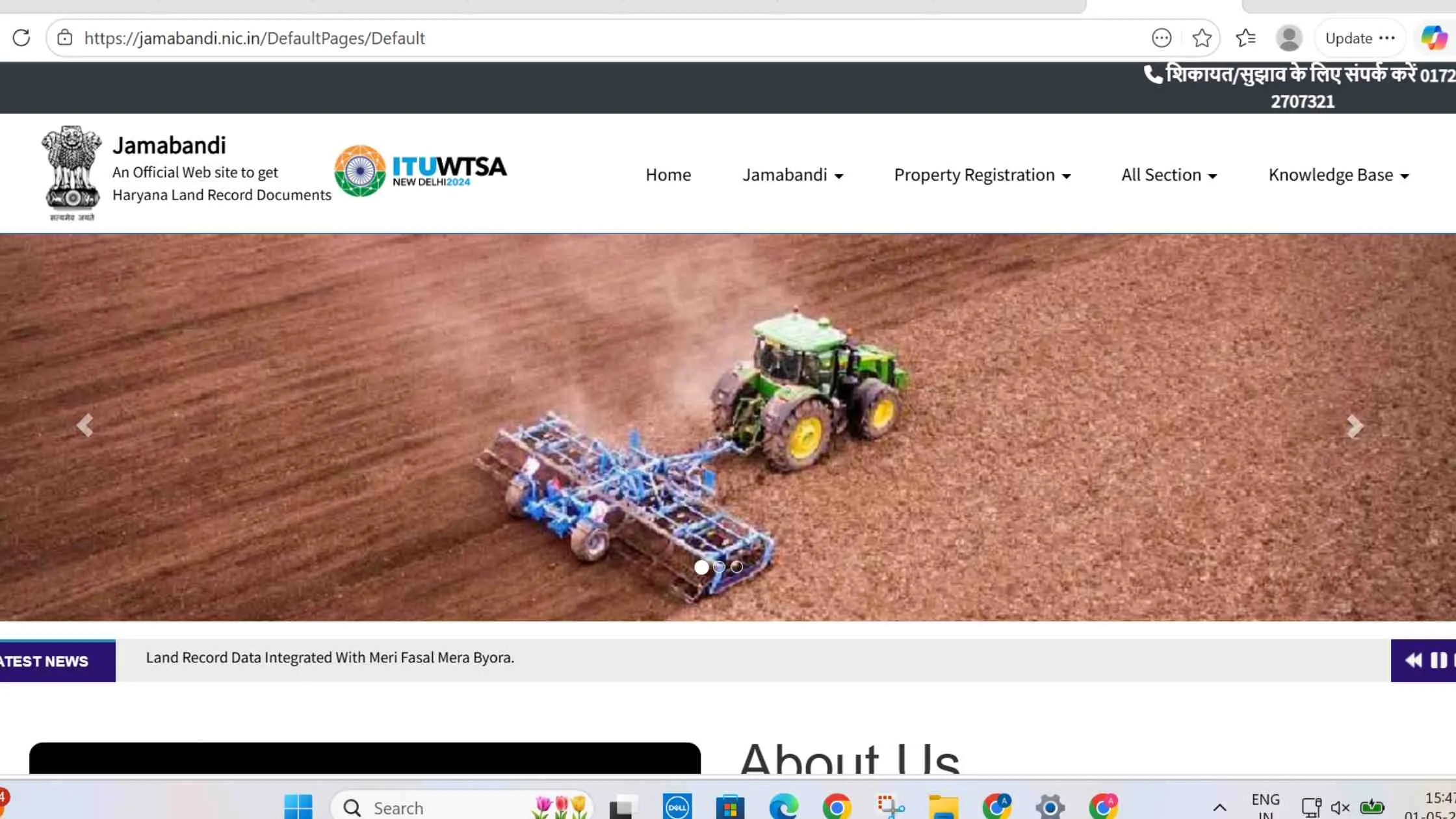
The process for viewing a land map on the Jamabandi portal is genuinely straightforward, it requires no registration or login for basic map viewing and produces results quickly once you have the basic property location details ready.
Step-by-Step Process
- Visit the Jamabandi Haryana Portal
- Click on All Sections
- Select View Cadastral Maps
- Choose your District, Tehsil, and Village
- The land map will appear on your screen
You can zoom in to see the detailed boundaries of each plot after the map appears. The map shows each plot's Khasra number which enables you to verify ownership details through cross-referencing. You should treat any boundary discrepancies between the map and what you have observed on the ground as an important warning sign which requires you to check with the local revenue office before you make any transactions.
How to Download Bhu Naksha Using Khasra or Khewat Number
The Khasra number is the field-level survey number assigned to each individual plot of agricultural land. The Khewat number identifies a specific ownership holding which consists of multiple plots that belong to the same person or family. Both can be used to locate specific land records on the portal.
If you want a specific land map, searching through Khasra or Khewat numbers is more accurate.
Steps to Download
- Open the Jamabandi Haryana Portal
- Click on View Cadastral Map
- Navigate to the Menu section within the map interface
- Choose either Search by Khasra or Search by Khewat depending on which number you have available
- Enter the required location details District, Tehsil, Village followed by the Khasra or Khewat number
- The specific plot map will appear on screen, highlighted within its surrounding context
- Use the download or print option to save the map as a PDF or take a printout for your records
How to View Jamabandi Nakal Online
The Jamabandi Nakal serves as the official Record of Rights document, which documents land ownership together with existing rights and all associated debts. The Bhu Naksha displays the geographical features of the land while the Jamabandi Nakal identifies the legal owner and their ownership conditions.
Steps to Check Nakal
- Visit the Jamabandi portal
- Click on Jamabandi Nakal for Checking
- You can search using any one of three identifiers; the owner's name, the Khasra number, or the Khewat number, use whichever you have confirmed access to
- The record will appear on screen with the ownership details, rights, and encumbrance information
How to Get Verified Jamabandi Copy
For legal or official use, you may need a verified copy with digital authentication because a standard viewed copy does not meet your requirements for Jamabandi Nakal which you need for legal proceedings and bank loan processing and court filing and official government application.
Steps
- Go to the Jamabandi portal
- Select Get Verifiable Copy of Nakal
- Log in using your registered mobile number
- Enter the OTP sent to your phone for identity verification
- Complete the search for your specific property record
- Download the verified document, this version carries a verification code that can be used to confirm its authenticity
Online vs Offline Land Record Access
|
Feature |
Online via Portal |
Offline via Tehsil |
|
Time Required |
Few minutes |
Several hours |
|
Convenience |
High |
Low |
|
Accessibility |
24x7 |
Limited hours |
|
Cost |
Free |
May include service fees |
|
Transparency |
High |
Moderate |
The online system is clearly faster and more efficient for most users.
Also Read: Bhulekh Uttar Pradesh 2026: How to Access & Check UP Land Records Online
Documents Required for ROR Application
If you need to formally apply for a Record of Rights rather than simply viewing existing records, having the right documents ready before you begin the process avoids delays and incomplete applications. The standard documents required include:
- Property details (district, village, tehsil)
- Khasra and Khewat numbers
- Ownership proof
- Identity and address proof
- Previous land records
- Application form
- Payment receipt
- Power of attorney if applicable
Benefits of Using Haryana Bhu Naksha Portal
The transition from traditional tehsil-based land record access methods to the digital system of the Jamabandi portal has brought about real benefits to all individuals who work with land buyers and sellers landowners developers and legal professionals in Haryana.
Key Benefits
- Easy access to land records from home
- Time-saving process without office visits
- Transparency in ownership and boundaries
- Real-time updates of records
- Reduced risk of fraud or disputes
It has become an essential tool for modern property transactions.
How to Book Deed Registration Appointment
Jamabandi portal allows property buyers and sellers to schedule their deed registration appointment online, eliminating the need to physically queue at registration offices early in the morning to secure a slot.
Steps
- Visit Jamabandi portal
- Click on Deed Registration Appointment
- Login with credentials
- Choose date and time slot
This avoids long queues at registration offices.
Final Thoughts
The Jamabandi Haryana Portal has made land record access simple, fast, and transparent. Whether you are buying property or verifying ownership, checking Bhu Naksha online is now a basic and essential step. Instead of relying on manual records, using digital tools ensures accuracy and saves time. If you deal with land in Haryana, learning this process is not optional anymore it is a necessity.






Ans 1. Bhu Naksha Haryana is the official digital cadastral map showing the exact boundaries, dimensions, and location of land plots in Haryana. To check it online, visit the official Jamabandi Haryana Portal, click on All Sections, select View Cadastral Maps, and then choose your District, Tehsil, and Village from the dropdown menus. The land map for the selected area will load on screen, allowing you to examine plot boundaries, Khasra numbers, and surrounding land layout without visiting any government office.
Ans 2. Jamabandi Nakal is the official Record of Rights (ROR) the written document that establishes who legally owns a piece of land, what rights they hold, and what encumbrances may be attached to it. Bhu Naksha is the geographic cadastral map showing the land's physical boundaries and dimensions. Together they provide a complete picture: Bhu Naksha confirms the land's shape and location, while Jamabandi Nakal confirms legal ownership and rights. Both should be checked before any land purchase in Haryana.
Ans 3. Yes Bhu Naksha and most land records on the Jamabandi Haryana Portal are available online completely free of charge. No fee is required to view the cadastral map, check Jamabandi Nakal, or search by Khasra or Khewat number. The portal is accessible 24 hours a day, 7 days a week without registration for basic viewing functions.
Ans 4. Your Khasra number can be found on previous land ownership documents including sale deeds, mutation orders, or any previously issued land record documents for the property. It can also be found by searching the Jamabandi portal using the owner's name under the "Jamabandi Nakal for Checking" section, the ownership record will display all associated Khasra numbers.
Ans 5. The Jamabandi Haryana Portal is the Haryana government's official online platform for land records, launched under the Digital India Land Records Modernisation Programme. It provides multiple land-related services including viewing and downloading Bhu Naksha (cadastral maps), checking Jamabandi Nakal (Record of Rights), tracking mutation status, booking deed registration appointments, accessing property ownership details for rural and urban areas, and obtaining verified copies of land records for official use. The portal eliminates the need for physical visits to tehsil offices for most land record access requirements.
Ans 6. A Khasra number is the field-level survey number assigned to an individual parcel or plot of agricultural land during the original land survey, it identifies a specific piece of land geographically. A Khewat number identifies an ownership holding, a grouping of all plots owned by a particular individual or family, regardless of how many separate Khasra numbers they contain.
Ans 7. Yes Bhu Naksha can be checked on a mobile phone in Haryana through the Jamabandi portal's mobile browser interface. While there is no dedicated official government app as of 2026, the portal is mobile-browser compatible and most functions including cadastral map viewing, Khasra search, and Jamabandi Nakal checking work through a smartphone browser.
Ans 8. To get a verified copy of Jamabandi Nakal from the Jamabandi Haryana Portal, select "Get Verifiable Copy of Nakal" on the portal, log in using your registered mobile number, and enter the OTP sent to your phone for identity verification. Complete the property search using your Khasra or Khewat number and download the verified document. This digitally authenticated copy carries a verification code confirming its official status and is appropriate for submission to banks, courts, and government offices that require official documentation.
Ans 9. Mutation status in Haryana can be checked through the Jamabandi Haryana Portal. Mutation refers to the process of updating land ownership records when property changes hands through sale, inheritance, or gift. After a property transaction, buyers typically track mutation status to confirm that the revenue records have been updated to reflect their ownership. The portal allows users to track mutation status using their property's location details and the mutation application number received when the mutation was applied for at the tehsil office or submitted online.
Ans 10. To download Bhu Naksha using a Khasra number, visit the Jamabandi Haryana Portal and click "View Cadastral Map.Navigate to the Menu section and select "Search by Khasra." Enter your District, Tehsil, Village, and the specific Khasra number.