
_1771410929.webp)
Table of Content
▲- Why Bhulekh UP is Important for Landowners and Buyers
- What Information Can You Find on Bhulekh UP?
- Key Terms to Understand Bhulekh UP
- How to Check Khasra and Khatauni UP?
- How to View Bhulekh Naksha UP (Land Maps)?
- How to Check Owner Share and Disputed Property?
- How to Check Bank Pledge or Loan Against Land in UP?
- How to Check Evacuee, Enemy, or Vacated Property?
- How to Find Your Village Code on Bhulekh UP?
- How to Check the Sale Status of Land (Bhukhand/Gata)?
- Common Issues on Bhulekh UP and Solutions
- How to Register and Track Complaints on Bhulekh UP?
- Bhulekh UP Contact Details
- Conclusion
Bhulekh Uttar Pradesh is the state government’s official online portal for accessing land records across all districts in UP. Launched in 2016, the portal allows citizens to view Khasra, Khatauni, mutation status, ownership details, and other property-related information without visiting the tehsil office.
To check your land records online on Bhulekh UP:
- Visit the official portal: http://upbhulekh.gov.in.
- Select the Real Time Khatauni Dashboard.
- Choose your district, tehsil, and village.
- Enter your Khasra number, Khata number, or owner name.
- View and optionally print your land record data.
This online solution ensures transparency and convenience, making it easy to access detailed land information from anywhere in Uttar Pradesh.
Why Bhulekh UP is Important for Landowners and Buyers
The Bhulekh UP portal plays a crucial role in property management and ownership verification. Some key reasons include:
- Transparency: Full access to land ownership, past transactions, and encumbrances.
- Convenience: No need to visit the tehsil offices for routine verification.
- Legal Awareness: Helps verify property disputes, bank pledges, and evacuee or enemy property.
- Data Accuracy: Access to Khasra, Khatauni, and precise land dimensions.
- Decision Making: Assists buyers and investors in making informed land purchases.
What Information Can You Find on Bhulekh UP?
The Bhulekh portal provides detailed land-related information under several categories:
|
Information Type |
Details Provided |
|
Khatauni Details |
Individual/family land holdings, Khata numbers |
|
Khasra Numbers |
Land parcel IDs with complete history |
|
Land Ownership |
Current and previous owners, contact info |
|
Transaction History |
Record of Rights (RoR), debts, disputes |
|
Plot Details |
Size, boundary limits, type of land |
|
Encumbrances |
Mortgages, bank loans, or legal disputes |
Key Terms to Understand Bhulekh UP
Before using the portal, familiarize yourself with these important terms:
- Khasra Number: Unique ID for a plot of land.
- Khata Number: Identifier for land ownership record of an individual/family.
- Tehsil: Local administrative unit where land is registered.
- District: Geographical administrative division.
- Gata Number: 16-digit unique number assigned to each land parcel by the Revenue Department.
How to Check Khasra and Khatauni UP?
To check Khasra-Khatauni on Bhulekh UP, follow these steps:
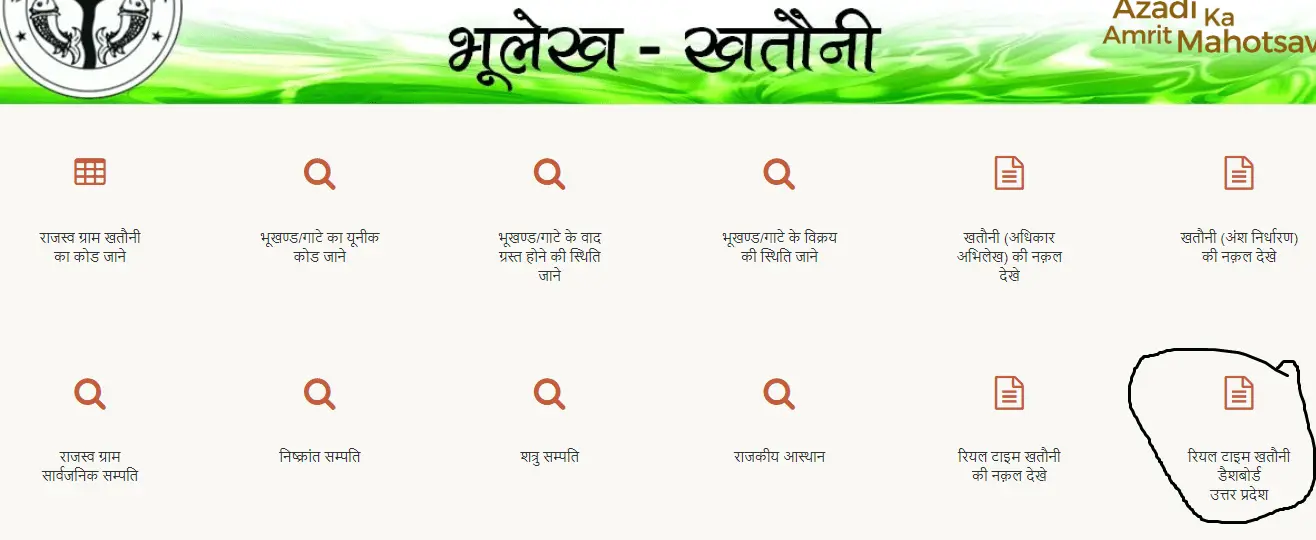
- Go to Bhulekh UP official portal.
- Click “Khatauni (adhikar abhilekh) ki naqal dekhein”.
- Enter the captcha and submit.
- Select your district, tehsil, and village.
- Search by Khasra/Gata number, Khata number, or owner name.
- Click “uddharan dekhein” to view account details.
- The portal will display your Khasra Khatauni UP details.
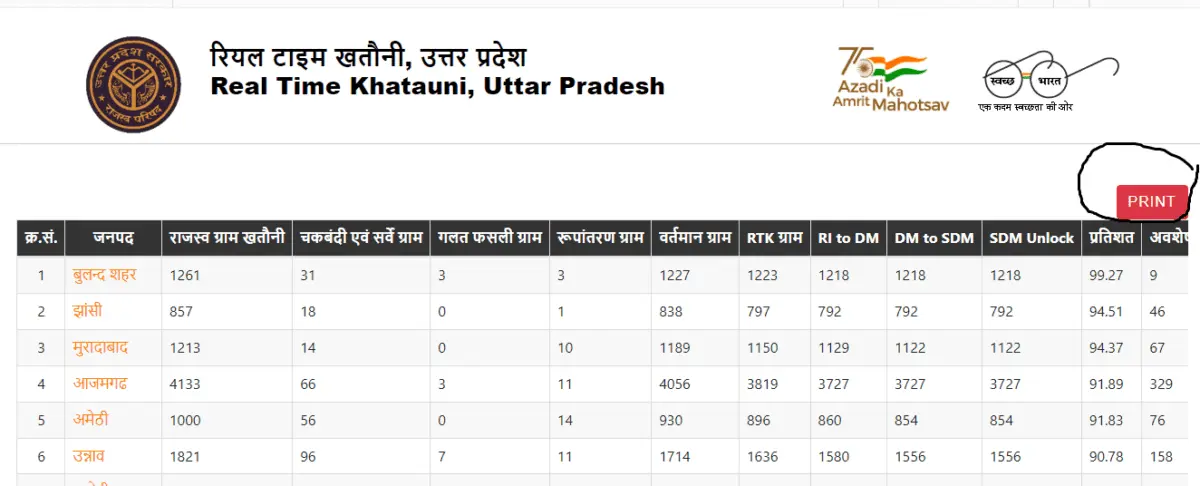
Example:
For a plot in Lucknow tehsil, enter the Khasra number 12345 and click submit. You’ll see the owner’s name, area, and transaction history instantly.
How to View Bhulekh Naksha UP (Land Maps)?
You can view the land map (Bhulekh Naksha) online using this process:
- Visit Public ROR page.
- Select district, tehsil, and village.
- Search using:
- Khasra/Gata number
- Khata number
- Owner name
- Date of ownership transfer
- The portal will display the map of the plot along with its boundaries.
How to Check Owner Share and Disputed Property?
Owner Share Details
- Select “Khatauni ansh nirdharan ki naqal dekhein”.
- Enter district, tehsil, village, and Khasra/Gata or Khata number.
- View ownership pattern and share of each owner.
Disputed Property
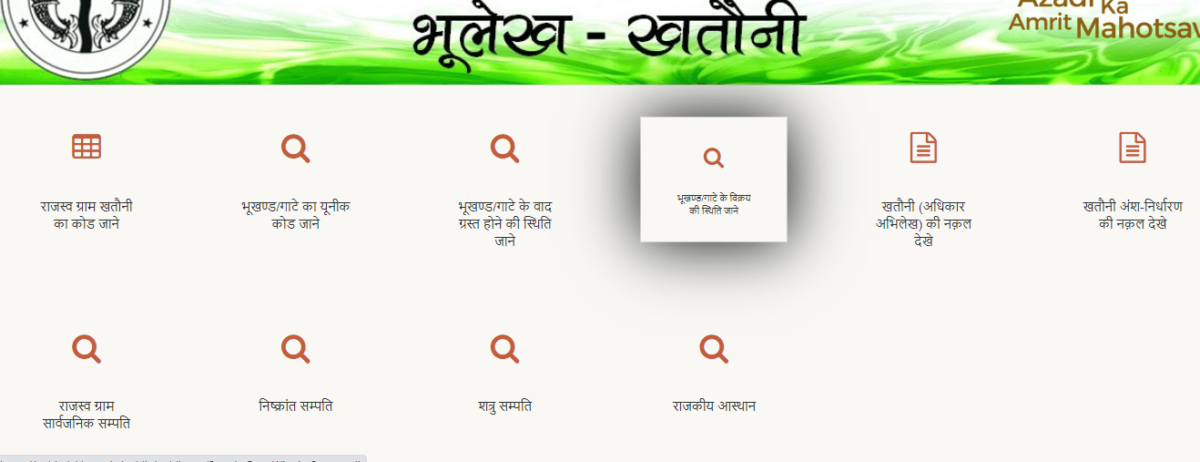
- Click “भूखंड/गाटे के वाद ग्रस्त होने की स्थिति जाने”.
- Select district, tehsil, and village.
- Enter Gata number to check encumbrances or legal disputes.
How to Check Bank Pledge or Loan Against Land in UP?
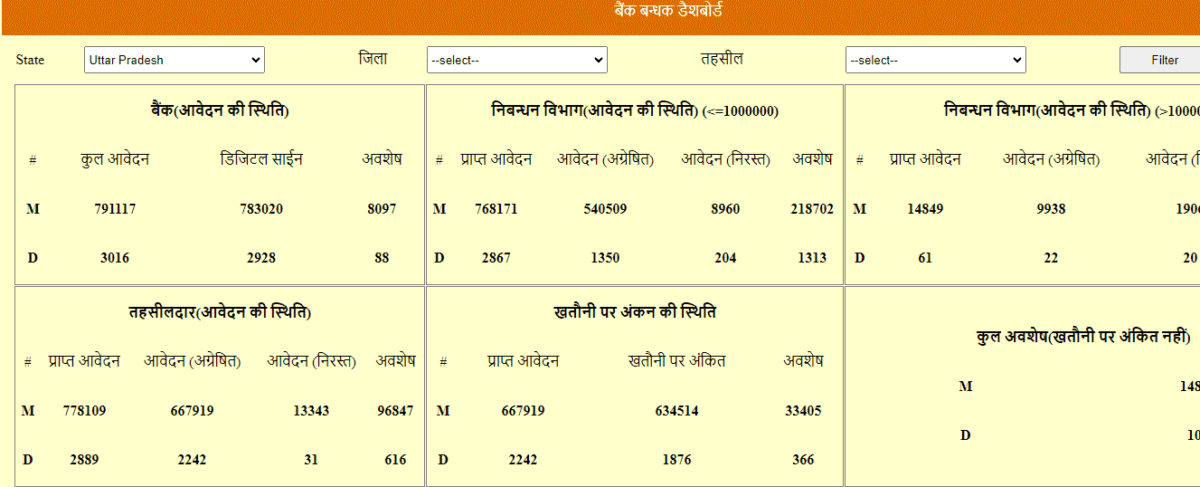
- On the homepage, click “Bank Bandhak Dashboard Uttar Pradesh”.
- Select district and tehsil.
- Click Filter to view all pledged properties.
- Scroll down to see bank-wise details of properties mortgaged.
How to Check Evacuee, Enemy, or Vacated Property?
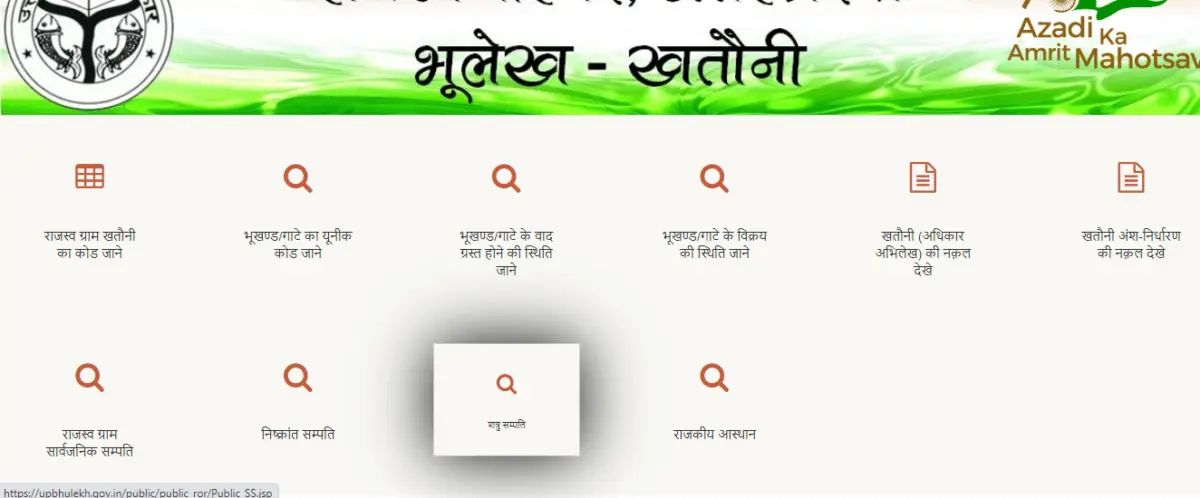
- Evacuee Property: Click “निष्क्रान्त सम्पति”, select district and tehsil.
- Enemy Property: Click “शत्रु संपत्ति”, select district and tehsil.
- Vacated Property: Click “निष्क्रांत संपत्ति”, select district and tehsil; view in Hindi or English.
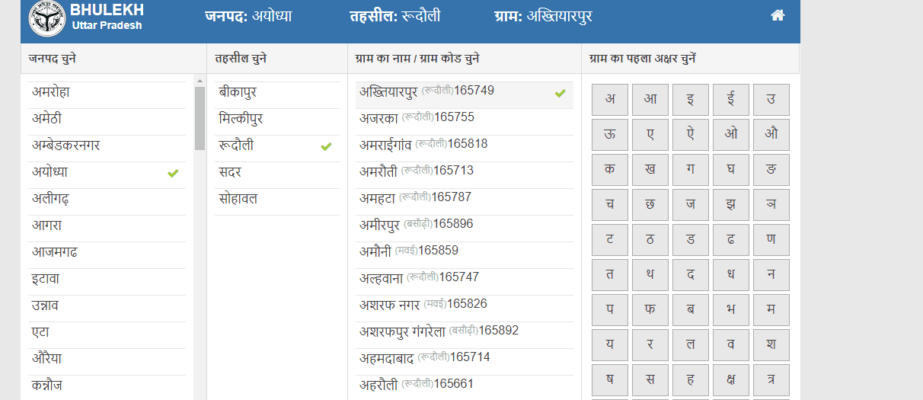
How to Find Your Village Code on Bhulekh UP?
Village codes are essential for land record searches.
- Click “राजस्व ग्राम खतौनी का कोड जाने” on the portal.
- Select the district and tehsil.
- The page will show all villages and their 6-digit revenue codes.
How to Check the Sale Status of Land (Bhukhand/Gata)?
- Click “भूखंड/गाटा के विक्रय की स्थिति जाने”.
- Select district, tehsil, village, and enter Khasra/Gata number.
- The portal displays sale status, including buyer, seller, and transaction date.
Common Issues on Bhulekh UP and Solutions
|
Issue |
Solution |
|
Missing village data |
Wait for updates or check district site |
|
Old information |
File mutation at Tehsil office |
|
Owner name errors |
Search using Khasra number |
|
Website not loading |
Clear cache or try another browser |
|
Errors in records |
File a complaint or contact local lekhpal |
How to Register and Track Complaints on Bhulekh UP?
Register Complaint
- Visit the portal and click “Complaint Registration”.
- You’ll be redirected to Jansunwai UP.
- Enter your mobile number, OTP, and complaint details to submit.
Check Status
- Click “Status of Complaint” in Jansunwai UP.
- Enter the complaint number, mobile, email, and captcha.
- View current status online.
Bhulekh UP Contact Details
- Phone: 0522-2630667
- Email: upbhulekh@gmail.com
- Address: 2nd Floor, West Block, Janpath, Lucknow – 226001
Conclusion
Bhulekh Uttar Pradesh has revolutionized access to land records in UP, offering a transparent, user-friendly digital platform for property owners, buyers, and investors. From viewing Khasra and Khatauni details to checking mutation, encumbrances, and disputes, the portal provides comprehensive land information across all districts. While the portal is informative, official verification requires visiting the Tehsil office. By following the outlined steps, users can efficiently manage and verify land records online.


Ans 1. Bhulekh Uttar Pradesh is the official online portal for accessing land records in UP. It allows citizens to view Khasra, Khatauni, mutation status, ownership details, and property-related information, ensuring transparency and convenience.
Ans 2. Visit upbhulekh.gov.in, select your district, tehsil, and village, then enter your Khasra number, Khata number, or owner name to view and print land records.
Ans 3. Khasra Number: A unique ID assigned to a plot of land. Khatauni: Records the ownership details of land for an individual or family.
Ans 4. Go to the Public ROR page on Bhulekh UP, select district, tehsil, village, and search by Khasra/Gata number, Khata number, or owner name to see the plot map and boundaries.
Ans 5. For owner share, select “Khatauni ansh nirdharan ki naqal dekhein” and enter the Khasra/Gata or Khata number. For disputed property, click “भूखंड/गाटे के वाद ग्रस्त होने की स्थिति जाने” and enter the required details.
Ans 6. Click on the “Bank Bandhak Dashboard Uttar Pradesh” on the homepage, select district and tehsil, and filter to view all pledged properties along with bank details.
Ans 7. Yes, the portal provides options for: Evacuee Property: “निष्क्रान्त सम्पति” Enemy Property: “शत्रु संपत्ति” Vacated Property: “निष्क्रांत संपत्ति” Select district and tehsil to view details.
Ans 8. Click “राजस्व ग्राम खतौनी का कोड जाने” on Bhulekh UP, select district and tehsil, and get the 6-digit revenue codes for all villages.
Ans 9. Click “भूखंड/गाटा के विक्रय की स्थिति जाने”, select district, tehsil, village, and enter Khasra/Gata number to see buyer, seller, and transaction date.
Ans 10. Register: Use “Complaint Registration” on the portal, submit your details via Jansunwai UP. Track: Click “Status of Complaint”, enter complaint number, mobile/email, and captcha to view the status online.
Ans 11. While the portal provides detailed information for convenience and transparency, official verification for legal purposes requires visiting the Tehsil office.