
_1770976628.webp)
Table of Content
▲
Paying House Tax in UP is mandatory for all property owners and contributes to local infrastructure and development. Whether you own residential, commercial, or industrial property, timely payment ensures compliance with the Municipal Corporation of Uttar Pradesh.
In this guide, we cover how to calculate property tax in UP, online and offline payment methods, applicable rebates, exemptions, and city-wise portals to pay house tax conveniently in 2026.
What Is House Tax in UP?
The house tax in UP is a local municipal tax levied on properties throughout the state. It applies to all residential, commercial, and industrial properties and is calculated based on property type, size, location, and usage.
Paying property tax:
- Legally validates property ownership
- Contributes to municipal development projects
- Helps avoid penalties, late fees, or legal disputes
Also Read: Top Posh Areas in Noida With Property Prices & Lifestyle
How to Calculate House Tax in UP?
Property tax in Uttar Pradesh is influenced by:
- Type of property (residential, commercial, industrial)
- Location and municipal limits
- Size or built-up area
- Property usage
Step-by-Step Calculation
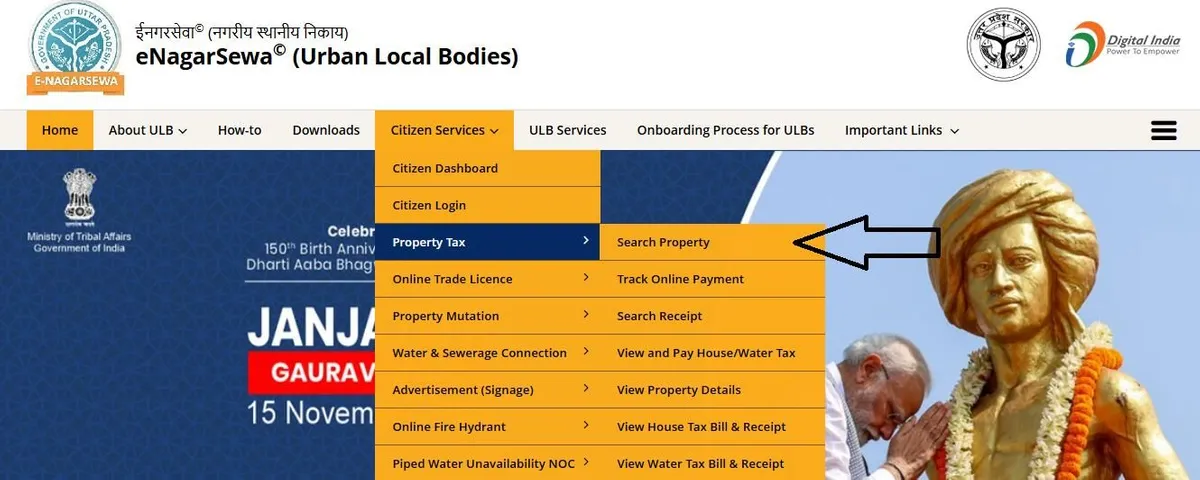
- Visit the UP Nagar Nigam Website:
e-nagarsewaup.gov.in - Navigate to Citizen Services → Property Tax → Search Property
- Enter your Property ID, owner details, and address
- Fill in property details such as size, usage, and area
- Calculate the assessed property tax
House Tax Formula
Property Tax=Annual Rental Value (ARV)×Applicable Tax RateProperty Tax=Annual Rental Value (ARV)×Applicable Tax Rate
Example:
- Property Annual Rental Value: ₹3,00,000
- Tax Rate: 10%
- Property Tax Payable = ₹3,00,000 × 10% = ₹30,000
How to Pay Property Tax in UP Online
Online payments are convenient and fast. Follow these steps:
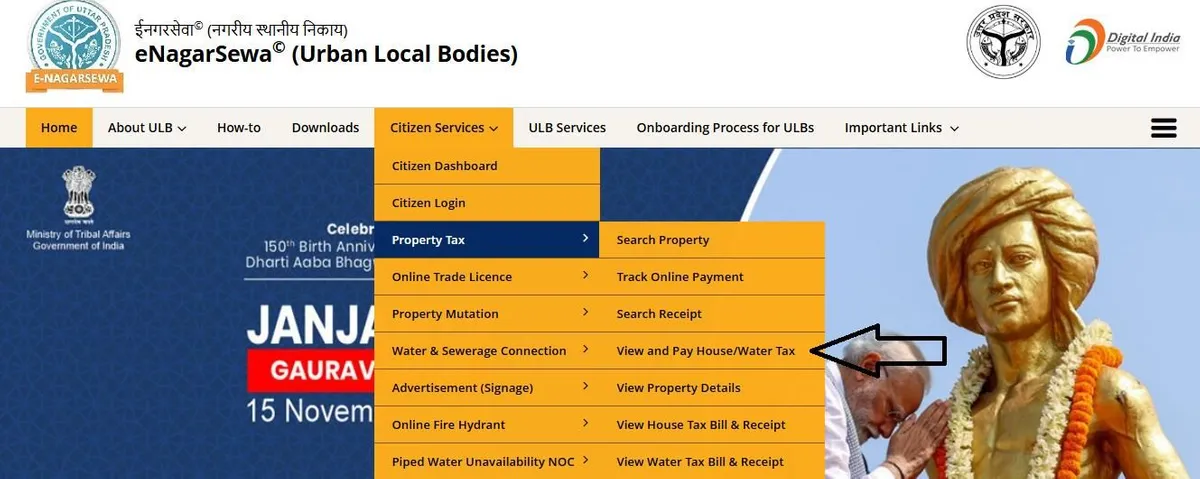
- Visit the e-NagarSewa portal
- Go to Citizen Services → Property Tax → View & Pay House/Water Tax
- Click Proceed to Citizen Login
- Enter Property ID, owner name, and property details
- Review calculated house tax amount
- Pay via UPI, debit/credit card, or internet banking
- Download/print the payment receipt
City-wise Property Tax Portals in UP
|
City |
Official Portal |
|
Lucknow |
|
|
Ghaziabad |
|
|
Kanpur |
|
|
Agra |
|
|
Meerut |
How to Pay UP Property Tax Offline
- Visit your Municipal Corporation office
- Carry Property ID, identity proof, and ownership documents
- Provide details to the authorized official
- Verify the calculated property tax
- Make payment via cash, demand draft, cheque, or card
- Collect the property tax receipt
Rebates on House Tax in UP
Municipal Corporations offer rebates to encourage timely payments, such as:
- Lucknow Nagar Nigam: 10% rebate for online payment by 30th June 2026
- Rebates vary across cities and payment modes
Tip: Always check the official Nagar Nigam portal for updated rebate offers.
Also Read: Circle Rate in UP 2025: A Complete Guide for Homebuyers
Exemptions Under Uttar Pradesh Property Tax
Property tax exemptions in UP include:
- Properties used for public worship (temples, mosques, churches, gurudwaras)
- Properties for charitable purposes (schools, hospitals, orphanages, old age homes)
- Public burial or cremation grounds
- Ancient monuments
- Agricultural land and farm buildings
- Self-occupied residences for individuals with disabilities
Conclusion
Paying House Tax in UP is mandatory, ensures legal compliance, and contributes to the local infrastructure. With the e-NagarSewa portal and city-specific online/offline options, property owners can calculate and pay taxes conveniently. Timely payments may also qualify for rebates, while exemptions reduce the burden for eligible properties.
By understanding the calculation formula, payment modes, and city-specific rules, you can stay compliant and avoid penalties, making property ownership in Uttar Pradesh seamless.




Ans 1. Property tax in UP is calculated based on the Annual Rental Value (ARV) of the property and the applicable tax rate set by the Municipal Corporation. The formula is ARV multiplied by the tax rate, and the amount depends on property type, size, location, and usage.
Ans 2. You can calculate house tax through the official e-NagarSewa portal at e-nagarsewaup.gov.in by entering your Property ID, owner details, and property information under the Property Tax section.
Ans 3. Visit the e-NagarSewa portal, select “View & Pay House/Water Tax,” log in using your Property ID, verify the tax amount, and complete payment through UPI, debit/credit card, or net banking. You can download the receipt after successful payment.
Ans 4. Yes, you can visit your local Municipal Corporation office with your Property ID and ownership documents, verify the tax amount, and pay via cash, cheque, demand draft, or card at the counter.
Ans 5. Property owners in Lucknow can pay house tax through the official portal of Lucknow Municipal Corporation at lmc.up.nic.in.
Ans 6. Yes, many municipal corporations offer rebates for early or online payments. For example, Lucknow often provides a rebate for payments made before a specified deadline, but offers vary by city.
Ans 7. Exemptions apply to properties used for public worship, charitable institutions like schools and hospitals, agricultural land, burial grounds, ancient monuments, and certain self-occupied homes of persons with disabilities.
Ans 8. Yes, paying house tax is mandatory for all residential, commercial, and industrial property owners. Non-payment can result in penalties, interest charges, or legal action by the Municipal Corporation.
Ans 9. You generally need your Property ID, owner name, property address, and basic property details such as type and built-up area to calculate or pay the tax.
Ans 10. Delayed payment can attract penalties and late fees, and continued non-compliance may lead to legal notices or recovery proceedings by the local municipal authority.