
_1776167949.webp)
✦ AI Summary
Table of Content
▲- What Is Property Tax in Chandigarh?
- Who Needs to Pay Property Tax in Chandigarh?
- Residential vs Commercial Property Tax in Chandigarh
- How Property Tax Is Calculated in Chandigarh
- How to Pay Property Tax in Chandigarh Online (2026 Process)
- How to Download Property Tax Receipt in Chandigarh
- How to Pay Property Tax Offline
- Rebate and Penalty Rules (Chandigarh)
- Documents Required for Property Tax Payment
- Online vs Offline Payment Comparison
- Benefits of Paying Property Tax on Time
- Common Mistakes to Avoid
- Chandigarh Property Tax Helpline
- Conclusion
If you own a house, shop, or an empty plot in Chandigarh, paying property tax every year is a must. Missing it means penalties and extra interest, when you try to sell or transfer your property later. You can now pay it online from home in just a few minutes. This guide covers everything, how the property tax is calculated, how to pay your house tax in both online and offline mode and download your receipt in 2026.
What Is Property Tax in Chandigarh?
The annual property tax is a revenue source for the Municipal Corporation Chandigarh. Property owners whether you are residential or commercial have to pay property tax on yearly basis for the city development including constructing or maintaining roads, for water drainage system, towards city cleanliness and much more necessities. It is mandatory for every property owner to pay taxes on a given time period. Basically your paid tax functions as a financial contribution that supports the development of the city.
Who Needs to Pay Property Tax in Chandigarh?
If you are an owner of any residential or commercial property in Chandigarh, you have to pay this annual charge to the Municipal Corporation of Chandigarh.
- Owners of residential houses, flats, or apartments whether self-occupied or rented out
- People who own commercial shops, offices, showrooms, or malls
- Institutional buildings owners of schools or colleges
- People who are owners of vacant plots or un-occupied land
Even if your property is empty and generating no rental income, the tax still applies.
Also Read: Everything You Must Know About Chandigarh Circle Rates
Residential vs Commercial Property Tax in Chandigarh
The tax structure varies depending on how your property is categorised and used.
Residential Property Tax
- Lower tax rates
- Applicable to self-occupied or rented homes
- Based on Annual Rateable Value
Commercial Property Tax
- Higher tax rates
- Based on earning potential of the property
- Includes shops, offices, and business spaces
How Property Tax Is Calculated in Chandigarh
Chandigarh uses the Annual Rateable Value system to calculate property tax.
Basic Formula
Property Tax = Annual Rental Value × Tax Rate
Factors Affecting Tax
- Location and sector: properties in prime sectors attract a higher ARV
- Property size: total built-up area directly impacts the valuation
- Usage type: residential or commercial classification changes the rate
- Construction type: the nature and quality of construction is also factored in
For an accurate figure, it's best to log into the official portal (details below) where the calculator auto-populates your dues based on your Property ID.
How to Pay Property Tax in Chandigarh Online (2026 Process)
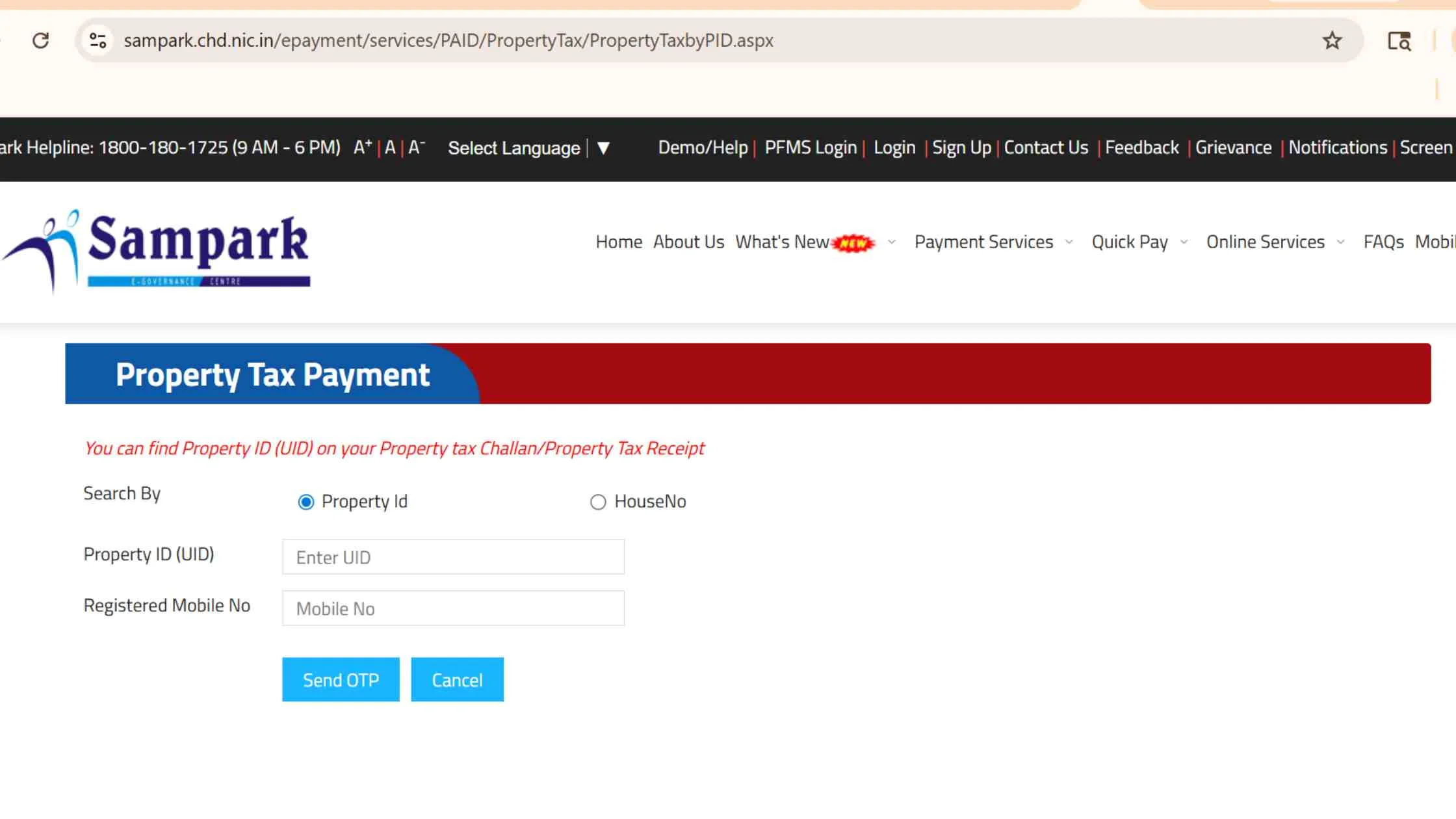
Online payment is the most efficient way for paying property tax which is available 24×7, takes only a few minutes to complete a transaction, and generates an instant receipt you can download and save. Here's exactly how to do it:
Official Portal
Step-by-Step Process
- Go to the official e-Sampark portal
- Click on Quick Pay - Property Tax
- Select your property category - Residential or Commercial
- Enter your Property ID / House Number and your registered mobile number
- Verify your identity via the OTP sent to your mobile
- Review your tax details and any outstanding dues
- Click Pay Now
- Choose your preferred payment method - UPI, Debit/Credit Card, or Net Banking
- Complete the payment and download your receipt immediately
Online payment is available 24×7 and generates instant receipts.
How to Download Property Tax Receipt in Chandigarh
.webp)
Once you've made your payment, you may need your receipt for a home loan application, property transfer, or simply for your own records. Many people don't realise you can re-download old receipts anytime from the e-Sampark portal without visiting any office.
Official Portal: https://sampark.chd.nic.in
Step-by-step process to download your receipt:
- Visit the e-Sampark portal
- Navigate to Property Tax - Payment History or Reprint Receipt
- Enter your Property ID / House Number
- Enter your registered mobile number
- Verify via OTP
- Your payment history will appear on screen, locate the relevant transaction
- Click Download or Print Receipt
- Save the receipt as a PDF or take a printout
How to Pay Property Tax Offline
If you're not comfortable with online transactions or face technical issues, you can visit any nearby e-Sampark Centre to pay in person. Here's what you need to carry:
- Your property details (Property ID or house number)
- Previous tax receipt, if available
At the centre, you fill out a challan form, pay via cash, cheque, or card, and walk out with a stamped physical receipt. The downside is that you're limited to office hours, and during peak seasons, especially near deadlines, queues can be long.
Rebate and Penalty Rules (Chandigarh)
Paying on time helps you save money.
Rebate Structure
|
Category |
Rebate |
|
Residential |
Up to 20% (early payment) |
|
Commercial |
Around 10% |
These rebates are available for payments made before the stipulated deadline, which is typically announced at the start of the financial year. Check the MCC portal for the exact cut-off date for 2026.
Penalty Rules
|
Delay |
Penalty |
|
After deadline |
25% penalty |
|
Interest |
~12% annually |
In short, paying early doesn't just keep you compliant, it can save you up to a fifth of your total tax bill on a residential property.
Also Read: Chandigarh Hikes Property Tax: What to Expect in the New Fiscal Year
Documents Required for Property Tax Payment
The process is fairly minimal on paperwork. Here's what you'll need:
Mandatory:
- Property ID or UID Unique Identification Number
- Owner's name as registered with MCC
- Registered mobile number for OTP verification
Optional but useful to have:
- Previous year's tax receipt
- Sale deed or ownership proof
Online vs Offline Payment Comparison
|
Factor |
Online |
Offline |
|
Convenience |
High |
Low |
|
Time |
Instant |
Time-consuming |
|
Availability |
24×7 |
Office hours |
|
Receipt |
Instant download |
Physical copy |
|
Effort |
Minimal |
Multiple visits |
Benefits of Paying Property Tax on Time
- It keeps your ownership records clean and dispute-free
- Smooth property resale and transfer processes depend on a clear tax history
- Banks often ask for up-to-date tax receipts before approving home loans or loan against property
- It reflects positively during property valuation for legal or financial purposes
- And of course, it directly funds civic services, better roads, drainage, and sanitation in your neighbourhood
Common Mistakes to Avoid
- Entering an incorrect Property ID: this is the most common reason payments don't go through or get tagged to the wrong property
- Not reviewing dues before paying: always check if there are arrears from previous years before making a new payment
- Missing the early payment window: the rebate deadline passes quickly and many people only realise when it's too late
- Not saving the payment receipt: losing it can cause unnecessary hassle during resale or tax audits
- Ignoring previous year dues: unpaid dues from earlier years accumulate interest and penalties separately
Chandigarh Property Tax Helpline
|
Service |
Contact |
|---|---|
|
MCC Helpline |
1800-180-1725 |
|
e-Sampark Support |
Conclusion
Through the e-sampark portal, your entire process from start to finish is performed digitally, so you simply need to provide your Property ID along with your registered mobile number for your entire process to be completed in minutes. There are three important points to keep in mind; First, ensure that you pay your property taxes prior to their deadline so that you can qualify for a rebate; Second, always retain a copy of your receipt; and thirdly, if you have any outstanding debts from past years that would have otherwise compounded, you need to pay these off before they become even larger.

Ans 1. Visit the e Sampark portal enter Property ID verify with OTP check dues and pay using UPI card or net banking.
Ans 2. The official portal is https://sampark.chd.nic.in for all property tax services.
Ans 3. It is calculated using Annual Rateable Value multiplied by the applicable tax rate.
Ans 4. Residential properties can get up to 20 percent rebate on early payment while commercial properties get around 10 percent.
Ans 5. You may face a 25 percent penalty along with additional interest charges.
Ans 6. Yes you can download or reprint receipts from the e Sampark portal using Property ID and OTP.
Ans 7. All owners of residential commercial institutional and vacant land properties must pay tax annually.
Ans 8. You need Property ID owner name and registered mobile number for OTP verification.
Ans 9. Entering wrong Property ID missing rebates ignoring old dues and not saving receipts.
Ans 10. It ensures legal ownership smooth resale loan approvals and supports city infrastructure development.