
_1775034768.webp)
✦ AI Summary
Table of Content
▲- How Do These Smart Overflow Alarms Actually Work?
- Types of Smart Water Tank Overflow Alarms Available in India
- Side-by-Side Comparison: Which Type Suits Your Home?
- What Does a Smart Overflow Alarm Cost in India in 2026?
- Installation: What the Process Actually Looks Like
- Mistakes That Make Even Good Devices Perform Badly
- Conclusion
Water wastage due to overflowing tanks is one of the most common yet ignored problems in Indian households. With rising water costs and increasing awareness around conservation, smart water tank overflow alarms with mobile app alerts have become a practical upgrade for modern homes. These devices not only prevent overflow but also give real-time updates directly on your phone.
In this guide, we break down the best options available in 2026, how they work, features, and how to choose the right one for your home.
How Do These Smart Overflow Alarms Actually Work?
The technology is simpler than most people expect. There's no complicated wiring involved, and most modern systems are designed so that a reasonably handy homeowner can set one up in under an hour.
The system typically has three components working together; a sensor inside the tank, a control unit connected to your home's power supply, and an app on your phone. Here's the basic flow:
- A water level sensor is placed inside the tank at the desired maximum fill point
- When water reaches that level, the sensor triggers the control unit
- The control unit sends a signal over WiFi to the connected app
- Your phone receives an alert, even if you're miles away
- On more advanced models, the motor is automatically switched off without you needing to do anything
Also Read: How Water Seepage Ruins the Structural Stability of Your Home
Types of Smart Water Tank Overflow Alarms Available in India
Rather than listing specific brand names that may change availability, here's a breakdown by category which is more useful when you're comparing products on Amazon, Flipkart, or local electrical suppliers.
1. Basic IoT-Based Water Level Controller
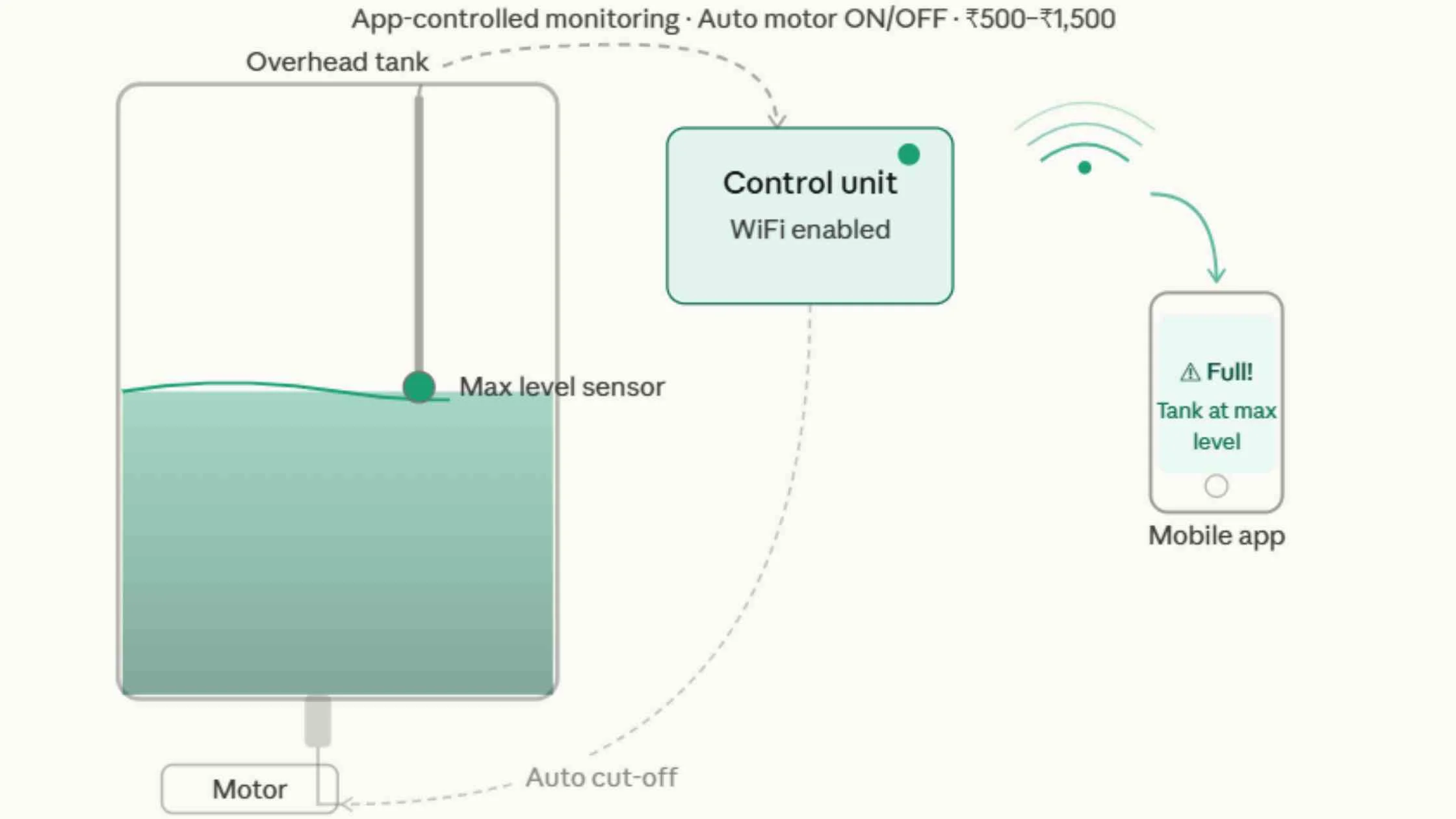
These are app-controlled units that handle the core job well monitoring water levels and alerting you when the tank is full. Most include auto motor ON/OFF, a real-time tank level display on the app, and are straightforward to install. Good fit for independent houses with standard overhead tank setups.
2. WiFi Smart Alarm with Buzzer
.webp)
A step up from the basic controller, these combine a loud audible alarm (useful if you're at home but not checking your phone) with instant mobile push notifications. Generally the most popular category for urban apartments is reliable, affordable, and doesn't require any technical expertise to configure.
3. GSM-Based Water Level Controller
.webp)
If your tank is in an area with inconsistent WiFi, a rural property, a farmhouse, or a terrace with poor signal, a GSM-based controller is the practical choice. It sends SMS alerts instead of app notifications, meaning it works anywhere your SIM card gets a signal. Slightly higher cost than basic WiFi models, but worth it where internet reliability is a concern.
4. Smart Home Integrated Water Controller
.webp)
For homes already running on an Alexa or Google Home ecosystem, these premium controllers plug into that setup cleanly. You can check tank levels via voice, set automated routines (motor on at 6 AM, off when full), and manage everything from a single smart home dashboard. These are overkill for most standard homes but make sense if you're already invested in home automation.
Side-by-Side Comparison: Which Type Suits Your Home?
|
Feature |
Basic Alarm |
WiFi Smart Alarm |
GSM Controller |
Smart Home System |
|
Mobile App Alerts |
No |
Yes |
Yes (SMS) |
Yes |
|
Auto Motor Cut-Off |
No |
Yes |
Yes |
Yes |
|
Internet Required |
No |
Yes |
No |
Yes |
|
Works During Power Cut |
With battery backup |
With battery backup |
Yes (SIM-based) |
With battery backup |
|
Price Range |
₹500–₹1,500 |
₹2,000–₹5,000 |
₹3,000–₹6,000 |
₹5,000–₹10,000 |
|
Best For |
Small homes, basic use |
Urban apartments |
Rural/poor WiFi areas |
Smart home setups |
What Does a Smart Overflow Alarm Cost in India in 2026?
Pricing has become quite accessible across the board. The Indian market currently provides a genuine pricing breakdown which shows actual costs for all available products.
The basic model of a WiFi unit requires only ₹1,000–₹2,000 more than the mid-range WiFi unit yet delivers significant additional value. The most affordable option which homeowners choose will lead to their requirement of upgrades within the next twelve months.
- Basic alarm (no app): ₹500 – ₹1,500
- WiFi smart alarm with app: ₹2,000 – ₹5,000
- GSM-based controller: ₹3,000 – ₹6,000
- Premium smart home system: ₹5,000 – ₹10,000
Installation costs:
- DIY (most WiFi/GSM units): No additional cost
- Electrician for hardwired setups: ₹500 – ₹1,500 depending on city and complexity
For most households, the total spend including installation lands is between ₹2,500 and ₹6,000, and the water and electricity savings typically recover within a few months.
Also Read: Water Dampness in Wall: Causes, Prevention, & Effective Solutions
Installation: What the Process Actually Looks Like
Most smart overflow alarms are genuinely easy to install, the manufacturers have simplified this significantly compared to older systems. Here's the typical process for a standard WiFi unit. Setting everything up correctly from the start saves a lot of troubleshooting later. Pay particular attention to sensor placement.
- Mount the sensor inside the tank at the exact level where you want overflow alerts to trigger, not too high and not too low
- Connect the control unit to a nearby power socket and attach the motor wiring as per the diagram
- Download the manufacturer's app, create an account, and sync the device over your home WiFi
- Configure your alert preferences, push notifications, buzzer sensitivity, motor cut-off threshold
- Run a test fill cycle before relying on it fully confirm the alert arrives on your phone at the right level
Mistakes That Make Even Good Devices Perform Badly
A device that's poorly set up will frustrate you quickly and most people blame the product when the issue is actually the installation or configuration.
These are the errors that come up most frequently:
- Placing the sensor too close to the tank's ceiling the tank will overflow before the sensor triggers
- Not testing the system after installation always do a live test before trusting it to work when you're not home
- Skipping battery backup a power cut during tank filling is exactly when you need the alarm most
- Buying on price alone without checking reviews the ₹600 option on a random marketplace listing may not have a working app within six months
- Ignoring WiFi signal strength at the tank location this is the single most common cause of app not working complaints
- Not checking app compatibility some older devices run on discontinued apps or don't support newer Android/iOS versions
Conclusion
Water tank overflow is one of those problems that feels minor until you add up what it actually costs in water, electricity, and the time spent managing it manually every single day. Smart overflow alarms with mobile app alerts solve that problem cleanly, affordably, and with very little ongoing effort once set up.
You don't need to go for the most expensive system. For most homes, a reliable mid-range WiFi alarm with auto motor cut-off and a stable app will do everything you need. Buy from a brand with decent reviews, install it properly, test it once, and then genuinely stop thinking about your water tank.
Also Read This |
|
|---|---|
|
Virtual Reality in Real Estate The Next Frontier of Property Marketing |
|






Ans 1. It uses a sensor inside the tank connected to a control unit which sends alerts via WiFi or GSM when water reaches a set level.
Ans 2. WiFi controllers are ideal for urban homes while GSM controllers work better in areas with poor internet connectivity.
Ans 3. Yes most smart controllers come with auto motor cut off to stop water flow when the tank is full.
Ans 4. Basic alarms start from ₹500 while smart WiFi systems range between ₹2000 and ₹5000 and advanced systems go up to ₹10000.
Ans 5. No most modern systems are DIY friendly and can be installed within an hour with basic setup instructions.
Ans 6. Some models come with battery backup while GSM systems can still send alerts using SIM connectivity.
Ans 7. Yes smart controllers allow you to monitor water levels and control the motor remotely through a mobile app.
Ans 8. WiFi smart alarms with mobile alerts and buzzer are best suited for apartments due to ease of use and reliability.
Ans 9. Incorrect sensor placement weak WiFi signal and skipping testing are common mistakes that affect performance.
Ans 10. Yes premium models integrate with Alexa and Google Home for voice control and automation.